For Coloring Books and Kids' Books

AI Book Cover Generator

This AI book cover generator colors your page and draws your title into the cover.

The cover editor then lays out the back, the spine and the front at the size Amazon KDP prints.
Your title drawn into the art
12 title styles
16 KDP trim sizes
Try Color with AI once free
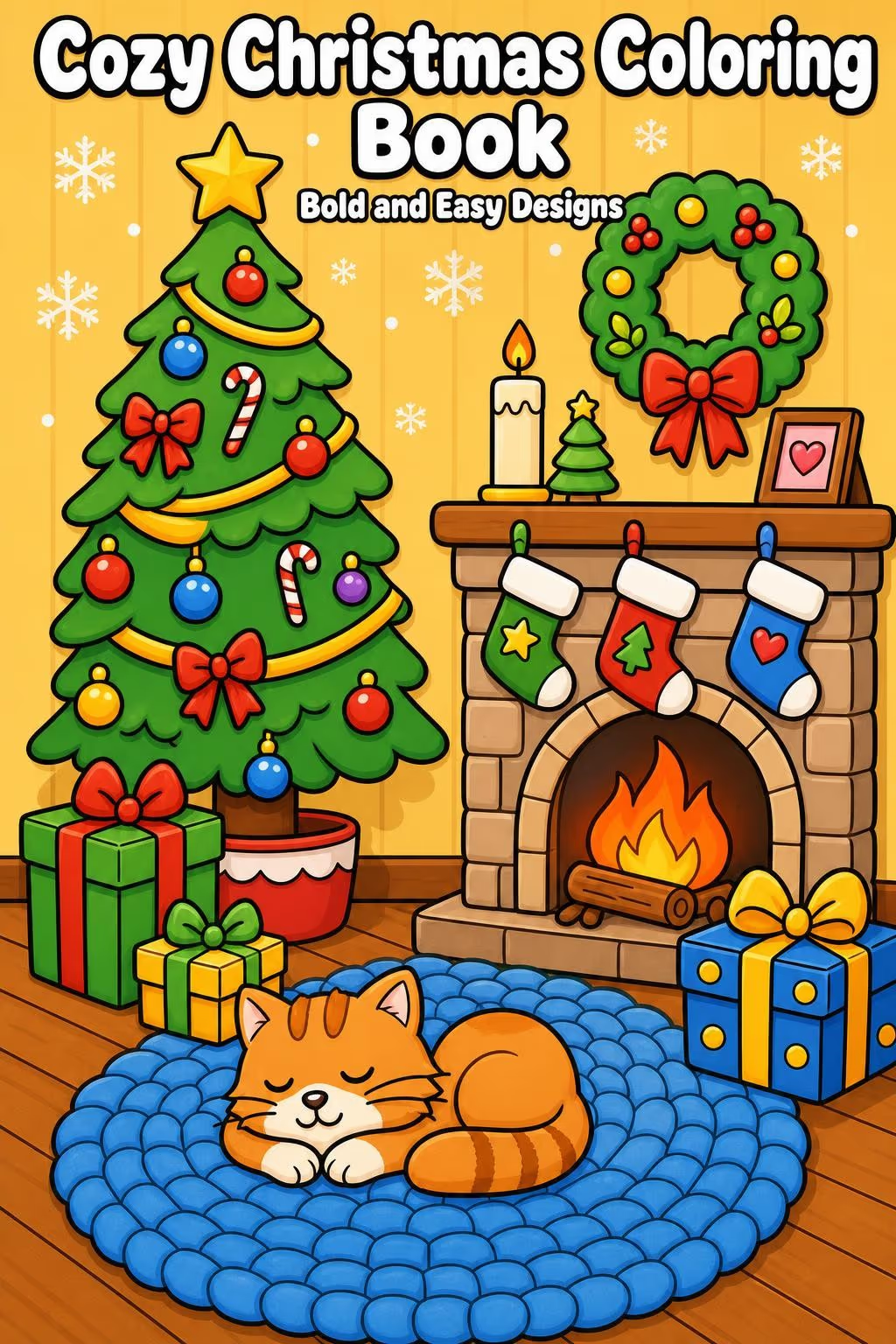
Create AI CoverAI book cover front with the title Cozy Christmas Coloring Book and the subtitle Bold and Easy Designs over a colored Christmas living room with a tree, a fireplace and a sleeping cat

A cover front made with Color with AI from a Christmas coloring page.

Made in Colorin

AI Book Covers Made from Coloring Pages

Each of these fronts started as a black and white page from the generator. Color with AI colored it and drew the title and the subtitle into it.
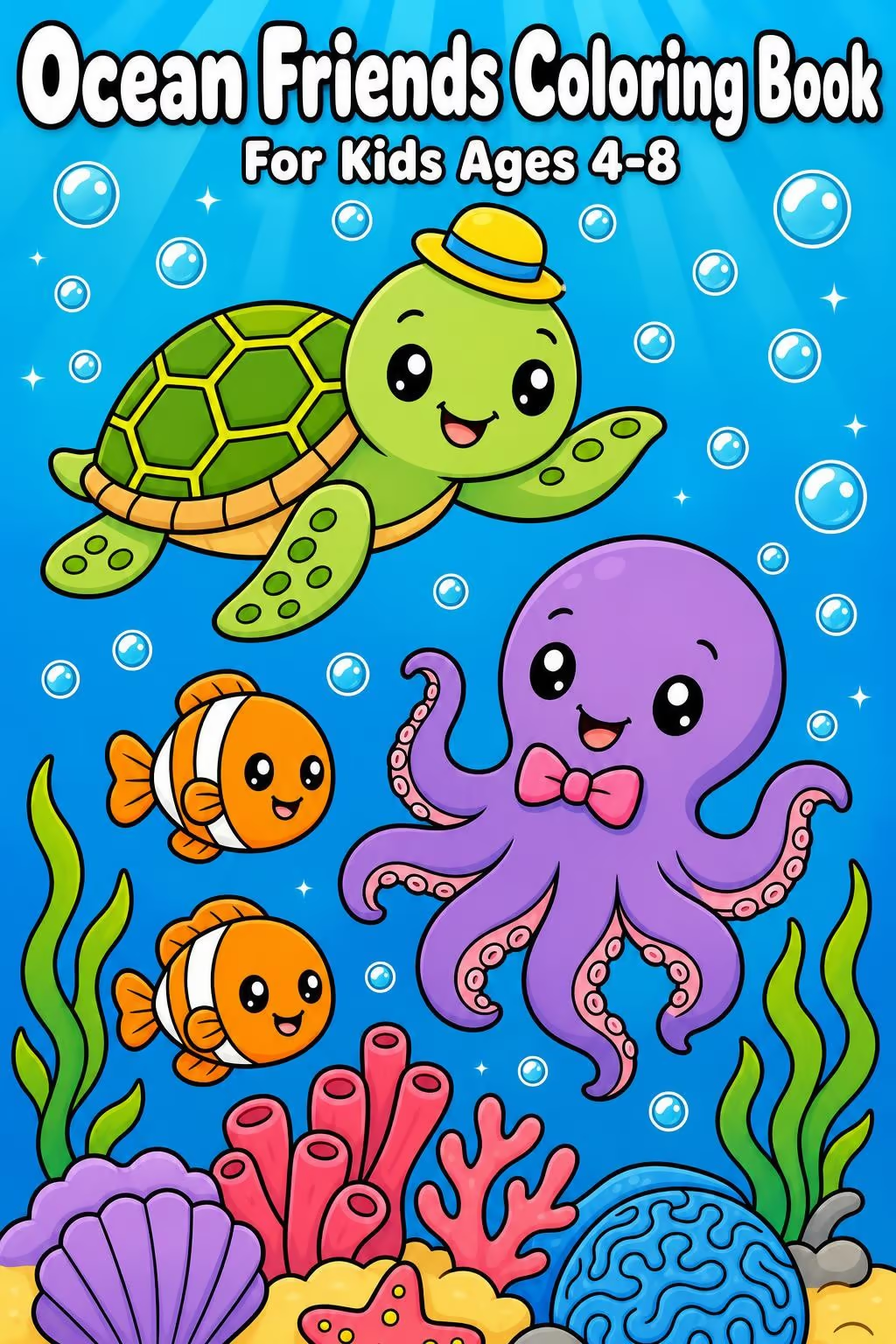
AI book cover front with the title Ocean Friends Coloring Book and the subtitle For Kids Ages 4-8, with a smiling sea turtle, an octopus and two clownfish over a coral reef
Ocean FriendsA Kawaii page of sea animals, with the title in the Cartoon text style.
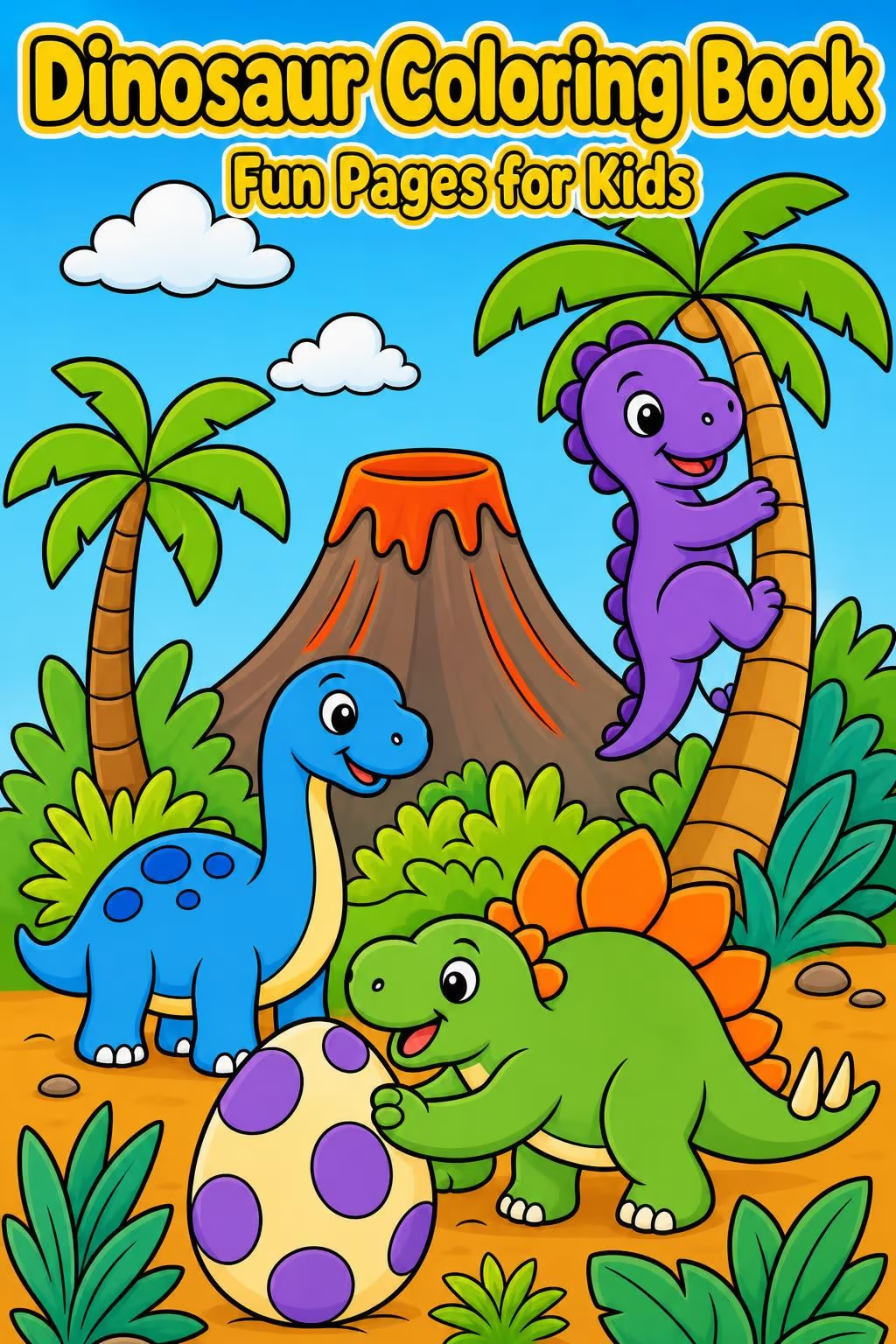
AI book cover front with the title Dinosaur Coloring Book in yellow letters and the subtitle Fun Pages for Kids over friendly dinosaurs, a spotted egg, palm trees and a volcano
Dinosaur Coloring BookA Cartoons page of a dinosaur jungle, with the title in the Sticker style and yellow letters.
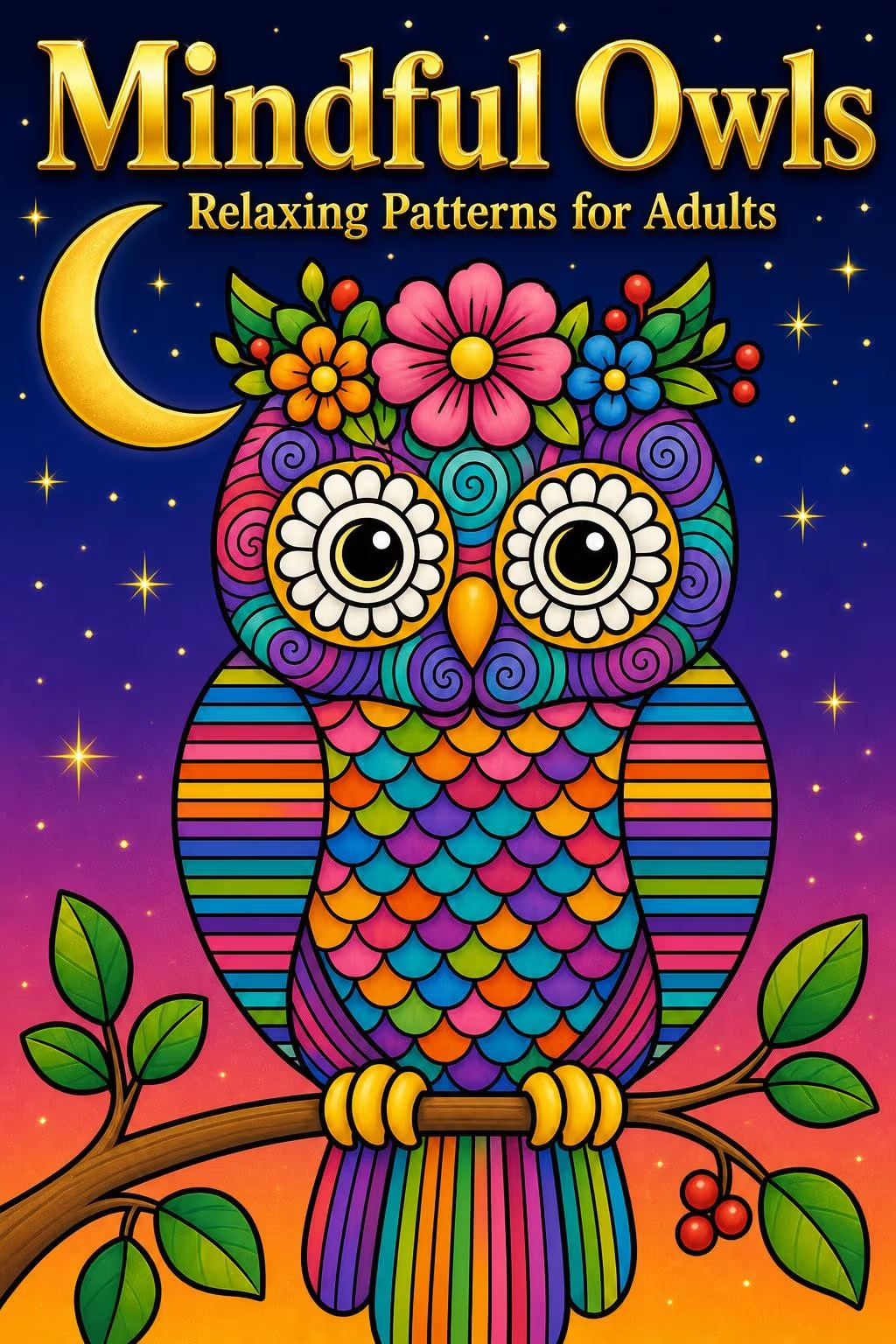
AI book cover front with the gold title Mindful Owls and the subtitle Relaxing Patterns for Adults, with a patterned owl under a crescent moon
Mindful OwlsA Zentangle owl for an adult coloring book, with the title in the Gold style.
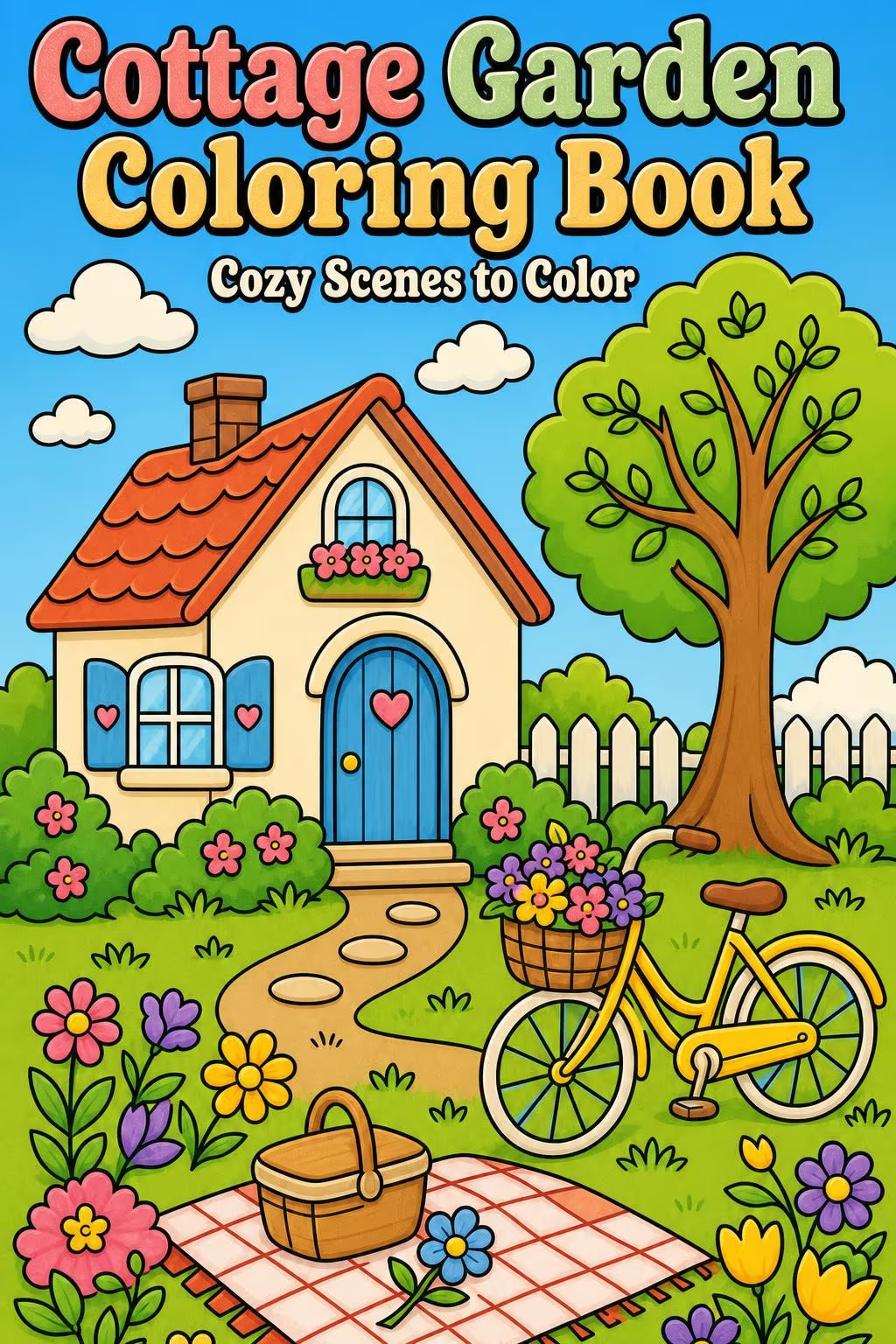
AI book cover front with the title Cottage Garden Coloring Book and the subtitle Cozy Scenes to Color, with a cottage, a flower garden and a bicycle with a basket of flowers
Cottage GardenA Storybook page of a cottage and its garden, with the title in the Retro style.
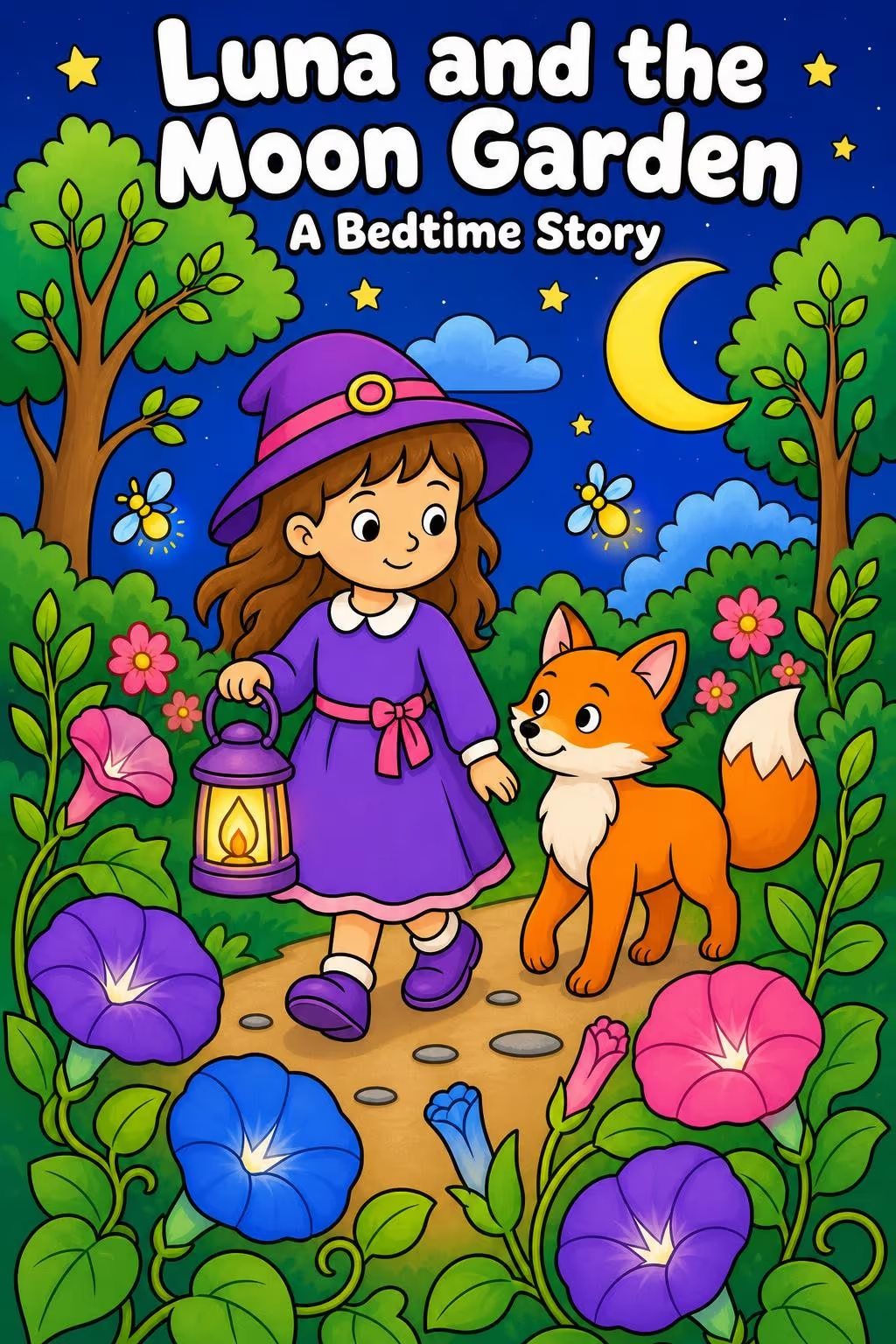
Kids book cover front with the title Luna and the Moon Garden and the subtitle A Bedtime Story, with a girl holding a lantern next to a fox in a night garden
Luna and the Moon GardenA Storybook page for a kids bedtime book, with the title in the Cartoon style.
AI book cover front with the title Cozy Christmas Coloring Book and the subtitle Bold and Easy Designs over a colored Christmas living room with a tree, a fireplace and a sleeping cat
Cozy ChristmasA Cartoons page of a Christmas living room, with the title in the Cartoon style and the colors chosen by the AI decides option.

Have a page you love? Make it the cover of your book.

Make My Book Cover β†’
How it works

Three Steps to an AI Book Cover

The front starts from a page you made in Colorin, so the cover looks like the book inside.

01

Pick a Page

In Cover creator, press Create New Cover and Use a Template. Click the frame on the front and press Add from Gallery, then hover a page from your Gallery or your Books.

02

Add Your Title

Press Color with AI and type your title in Create AI Cover. Pick the text layout, the text style and the text color, then press Send to AI coloring.

03

Put It on the Cover

The colored page shows up in the Gallery tab marked New. Press Add to cover. Set your trim size and page count in Dimensions and press Apply, then Save. Press Download cover, confirm the page count if the window asks and choose Document (PDF) for KDP.

Have your title ready? Draw it into your own cover.

Make My Book Cover β†’
Around the front

What Comes with Your AI Book Cover

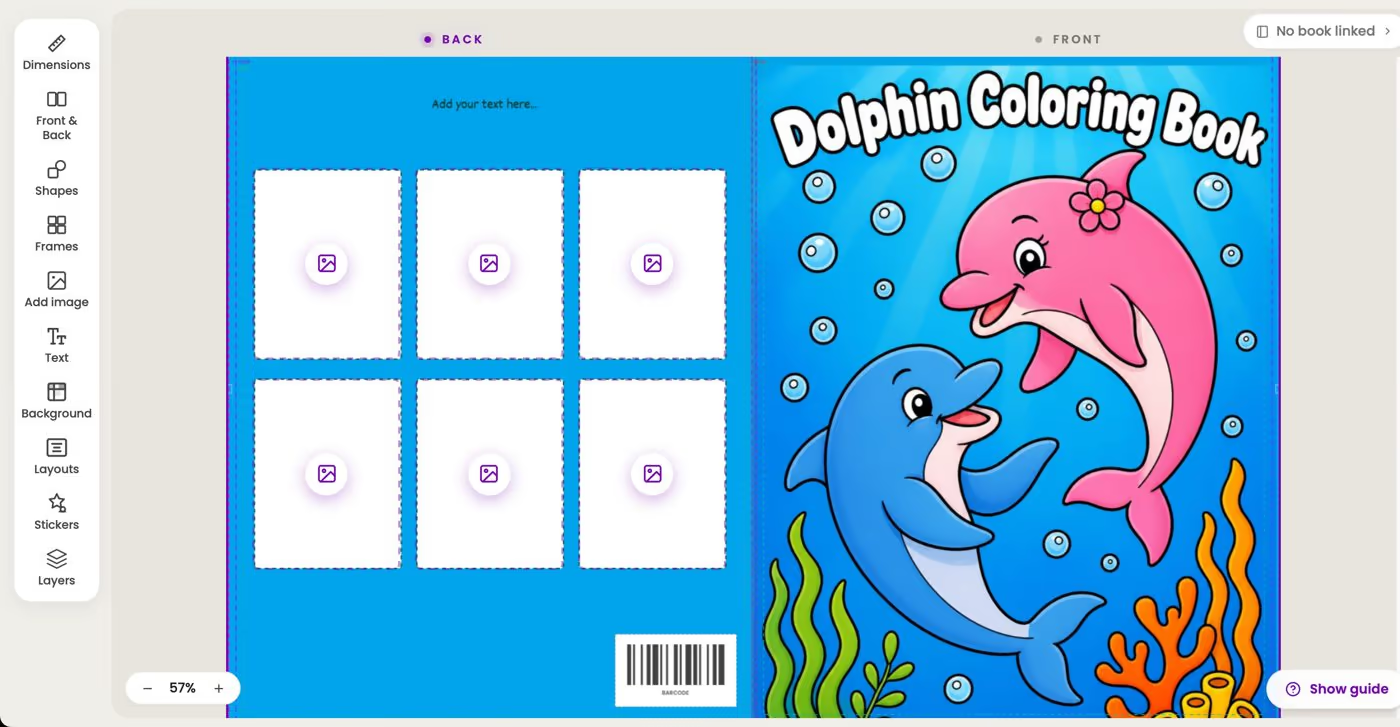
The AI makes the front, and the cover editor turns it into a full paperback cover with the back, the spine and the front in one wide page.
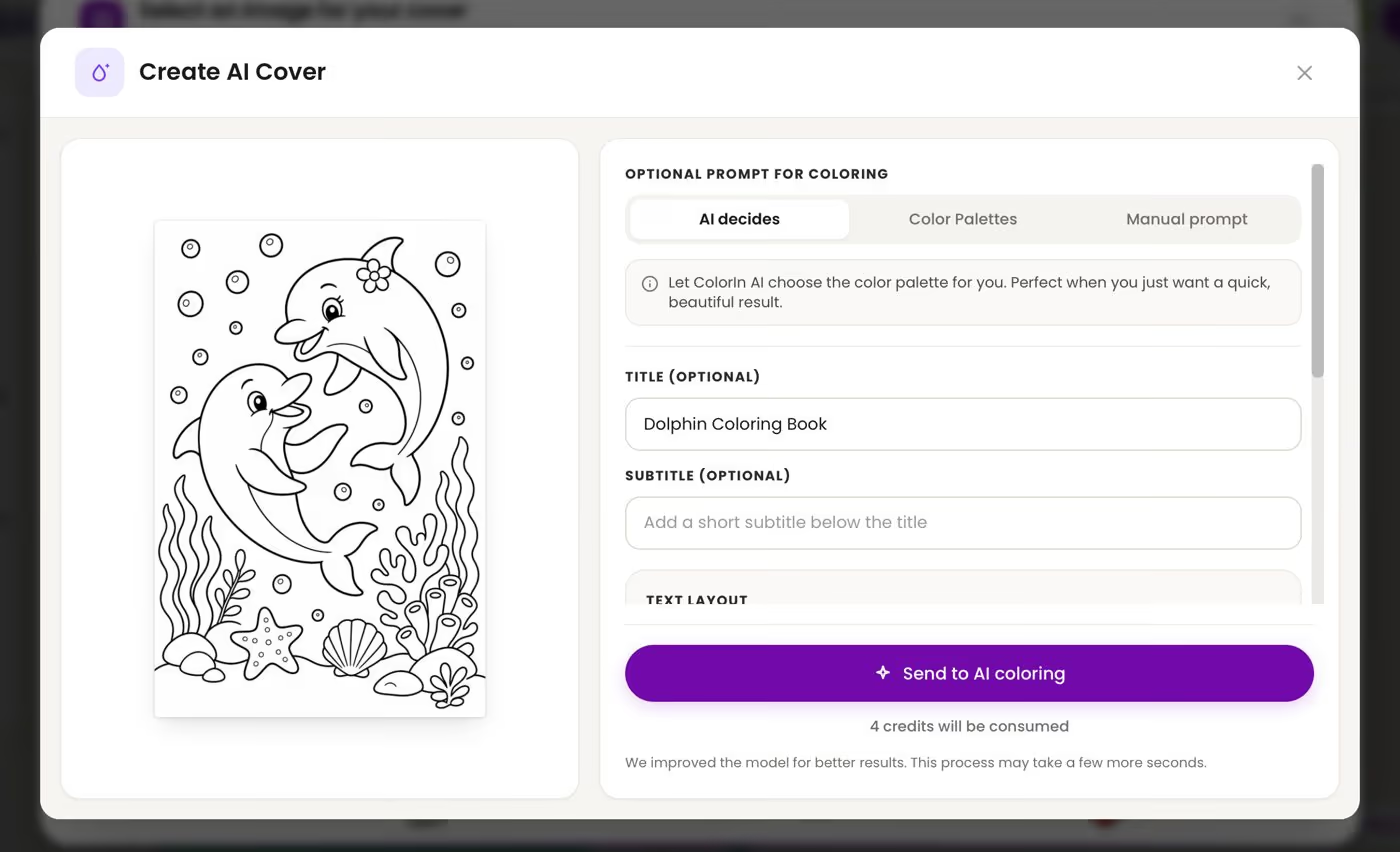
Create AI Cover window in Colorin, with a dolphin coloring page on the left and the title Dolphin Coloring Book typed in the Title field
Create AI CoverChoose AI decides, Color Palettes or Manual prompt for the colors. The title goes straight, curved up or curved down, in one of 12 text styles.
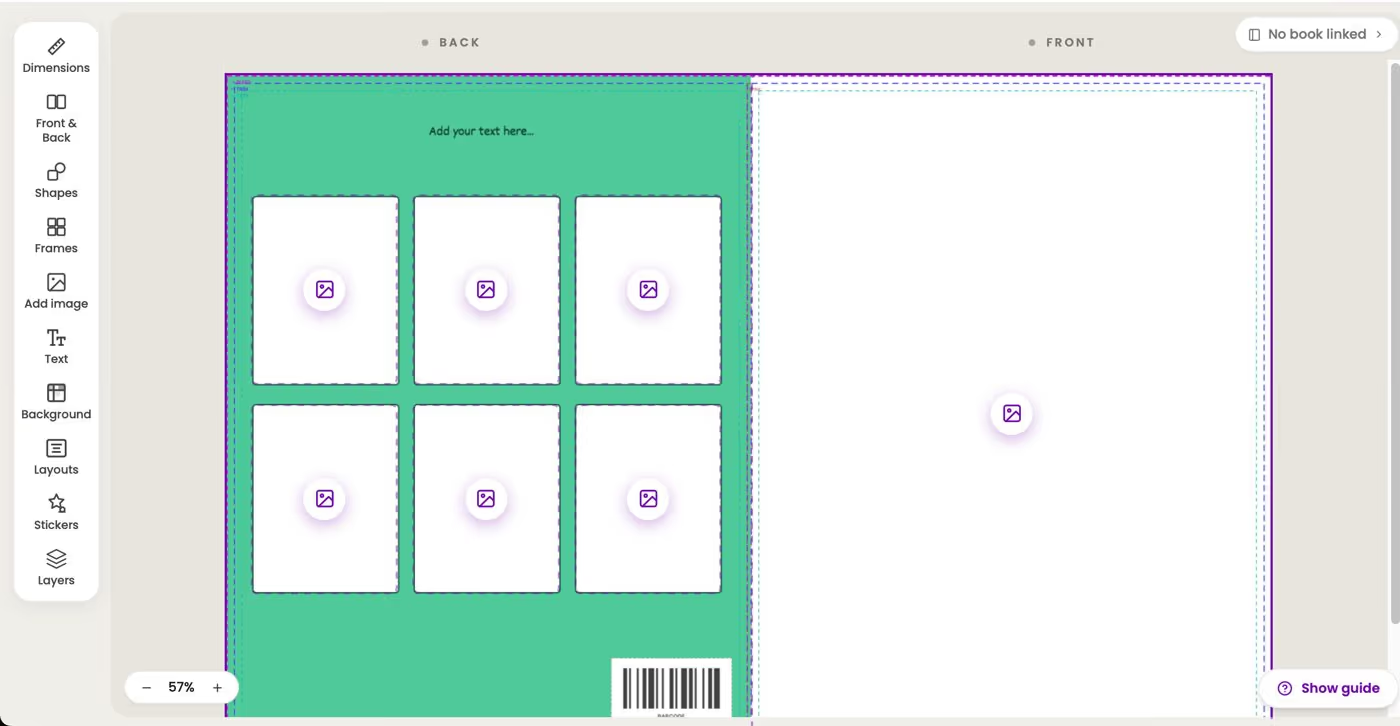
Full paperback cover in the Colorin cover editor, with the back cover on the left showing six frames for sample pages and the barcode spot, and the front with the title Dolphin Coloring Book on the right
The Whole Cover at KDP SizeThe editor lays out the back, the spine and the front for one of the 16 trim sizes Amazon KDP prints. The spine width follows the page count you set in Dimensions.
Coloring book cover template in the Colorin cover editor, with frames for sample pages on the back cover, the barcode spot and the trim lines
Lines for the Trim and the BarcodeLines on the editor show where KDP trims the cover and where text is safe. A sample barcode marks the spot where Amazon prints it, and none of them go into your file.
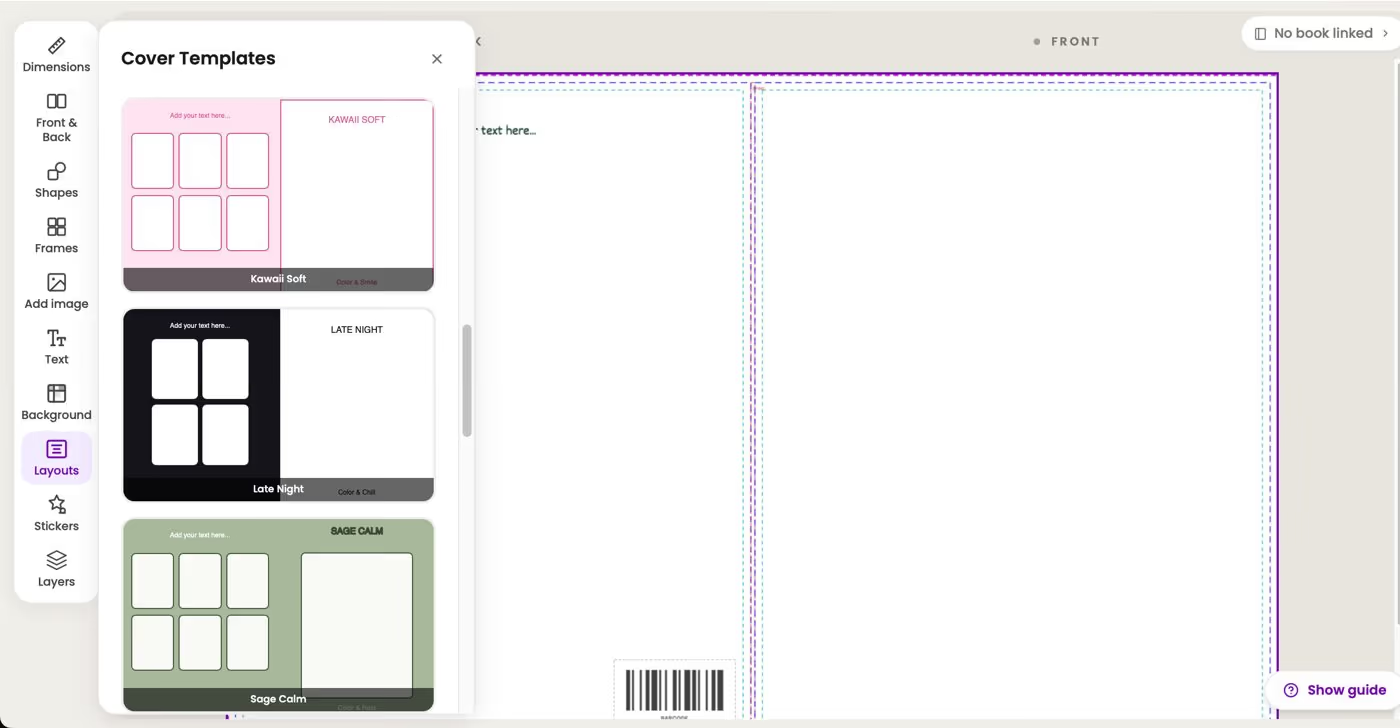
Cover Templates panel in the Colorin cover editor, showing the Kawaii Soft, Late Night and Sage Calm coloring book cover templates
16 Coloring Book TemplatesPrefer to place the title yourself? Open Layouts and pick one of 16 cover templates made for coloring books.

Ready for the full cover? Open Cover creator.

Make My Book Cover β†’
From your book to its cover

Make the Cover for a Book You Made in Colorin

When the coloring book is already in your Colorin account, the cover can take its size and its page count from the book.

01

Open the Cover Editor

Press Create New Cover in Cover creator and choose Use a Template.

02

Link the Book

Before you save the cover, press No book linked at the top right of the editor, pick your coloring book and press Link. The trim size and the page count come from the book. If you download the book with blank pages between images, open Dimensions and pick the same number in Blank pages between drawings.

03

Download Both Files

Download the book as one PDF in the same trim size and the cover as a PDF, the two files a KDP paperback needs.

Is your book ready? Link it and make its cover.

Make My Book Cover β†’
Why Colorin

An AI Book Cover Made for Coloring Books

The cover generator sits next to the tools that make the pages, so the book and its cover come from the same place.

  • Your own page on the front

    The cover starts from a page of your book, so a buyer sees on the cover the drawings they will color inside.

  • The title drawn into the art

    Color with AI draws the title and the subtitle into the picture, and the style and the color you pick guide how the letters look.

  • Sized for KDP

    The 16 trim sizes are the standard ones Amazon KDP prints, and the spine width follows the page count you set in Dimensions.

  • A KDP check before you download

    The header says KDP-ready when the dimensions, the page count and the image resolution meet Amazon KDP's recommendations, and lists what to change when they don't.

  • Made for coloring books and kids' books

    The art comes out in the illustrated style of a coloring page. It suits coloring books and picture books, not the photo covers of a thriller or a romance novel.

Have a Page You Love?

Make It Your Cover.

Color it with AI, add your title and download a cover sized for Amazon KDP.

Make My Book Cover
Who uses it

A Cover for Every Coloring Book

The same AI cover works for a book you sell on Amazon, a gift with a name in the title and a book for a class.

For KDP Sellers

A Cover Ready to Upload

Turn the best page of your coloring book into its cover and download it at the size KDP prints.

For Personalized Books

A Name in the Title

Draw a child's name into the title of a birthday or holiday coloring book you give as a gift.

For Teachers

A Class Coloring Book

Give a coloring book of class pages a colored cover, with the name of the class in the title.

For Families

A Family Keepsake

Turn a coloring page made from a family photo into the cover of your family's book.

Have a book in mind? Give it a cover made from its own pages.

Make My Book Cover β†’
Colorin AI Pricing

Choose the Plan That Fits You

Color with AI comes with the Essential, Pro and Business plans and uses 4 credits. A free account can try it once. Every paid plan includes book covers. You can make up to 5 on Hobby, 20 on Essential, 60 on Pro and as many as you want on Business.

Hobby

For coloring lovers & first-time creators
USD14.99/mo
Unused credits roll over
500 credits/month
Up to 166 image generations
Creator Toolkit
  • βœ“Commercial license included
  • βœ“Upload your own character
  • βœ“Convert any photo into a drawing
  • βœ“Fix and enhance images with AI
  • βœ“Edit images with brush, pencil & text
  • βœ“Download PDFs in multiple sizes
  • βœ“Download templates without watermark
  • βœ“Unused credits roll over to the next month
  • βœ“Create in batch up to 15 pages at once
  • βœ“Generate up to 600 coloring ideas
  • βœ“Up to 3 active books in your library
  • βœ“Design up to 5 book covers
  • βœ•Color any drawing in one click
  • βœ•Add margins automatically
  • βœ•Priority access to new features
Subscribe

Essential

For creators ready to grow their collection
USD19.99/mo
Unused credits roll over
800 credits/month
Up to 266 image generations
Creator Toolkit
  • βœ“Commercial license included
  • βœ“Upload your own character
  • βœ“Convert any photo into a drawing
  • βœ“Color any drawing in one click
  • βœ“Fix and enhance images with AI
  • βœ“Edit images with brush, pencil & text
  • βœ“Download PDFs in multiple sizes
  • βœ“Download templates without watermark
  • βœ“Unused credits roll over to the next month
  • βœ“Add margins automatically (100 uses)
  • βœ“Create in batch up to 15 pages at once
  • βœ“Generate up to 1000 coloring ideas
  • βœ“Up to 14 active books in your library
  • βœ“Design up to 20 book covers
  • βœ•Priority access to new features
Subscribe

Business

For advanced creators scaling their catalog
USD99.99/mo
Unused credits roll over
5,000 credits/month
Up to 1,666 image generations
Creator Toolkit
  • βœ“Commercial license included
  • βœ“Upload your own character
  • βœ“Convert any photo into a drawing
  • βœ“Color any drawing in one click
  • βœ“Fix and enhance images with AI
  • βœ“Edit images with brush, pencil & text
  • βœ“Download PDFs in multiple sizes
  • βœ“Download templates without watermark
  • βœ“Unused credits roll over to the next month
  • βœ“Add margins automatically
  • βœ“Priority access to new features
  • βœ“Create in batch up to 50 pages at once
  • βœ“Generate unlimited coloring ideas
  • βœ“Unlimited active books in your library
  • βœ“Design unlimited book covers
Subscribe

Compare All Plans β†’

FAQ

Frequently Asked Questions

What is an AI book cover generator?

It is a tool that makes the art of a book cover with AI. In Colorin it colors one of your coloring pages and draws your title into it, and the cover editor turns that front into a full paperback cover.

Can I try it for free?

Yes. A free account can use Color with AI once. Book covers come with every paid plan, and Color with AI comes with the Essential, Pro and Business plans.

How many credits does an AI cover use?

Coloring a page with Color with AI uses 4 credits. Saving and downloading a cover use no credits.

Can I write my own title?

Yes. Type the title and a subtitle if you want one in Create AI Cover, then pick the text layout, the style and the color. Without a title, the page is only colored.

What kinds of books is it for?

Coloring books and kids' books. The art comes out in the illustrated style of a coloring page, so it does not make the photo covers of a thriller or a romance novel.

Can I use a drawing of my own?

A drawing you upload goes on the cover as it is. Color with AI works on the pages you made in Colorin, from your Gallery or your Books.

What sizes can the cover be?

The cover editor has the 16 trim sizes Amazon KDP prints for paperbacks. The spine width follows the page count you set in Dimensions, and the editor works out the size of the full cover for you.

How many covers can I make?

It depends on your plan. You can make up to 5 covers on Hobby, 20 on Essential, 60 on Pro and as many as you want on Business.

Can I make the cover on my phone?

The cover editor works on a computer or a tablet.

Can I sell a book with a cover made in Colorin?

Yes. What you make in your Colorin account comes with a commercial license, so you can sell your books on Amazon KDP or Etsy. The license does not cover characters or brands that belong to someone else.

Still deciding? Color one of your pages and see it as a cover.

Make My Book Cover β†’

Ready to Finish Your Coloring Book?

Give It Its Cover.

Color a page with AI, add your title and download a cover sized for Amazon KDP.

Make My Book Cover