Of six AI coloring book generators we tested, only Colorin AI finished a 10-page coloring book without a plan and offered it as a PDF. mycoloring.ai gave a color cover and the first page as a free sample. For a coloring page that looks closest to the test photo, mycoloring.ai, ColorBliss and Colorify AI scored higher than Colorin AI in our blind grading.
We ran the test on November 9, 2026, and asked every tool for the same 10-page coloring book before paying. Each tool also got the same photo to turn into a coloring page, and each tool with credits left got the same prompt.
Colorin AI is our product. We tested it the same day and the same way as the other tools, on a new account. The coloring pages were graded without the tool names. Two of the other accounts weren’t new, and the tables say which.
How Far Each Tool Got Before Paying
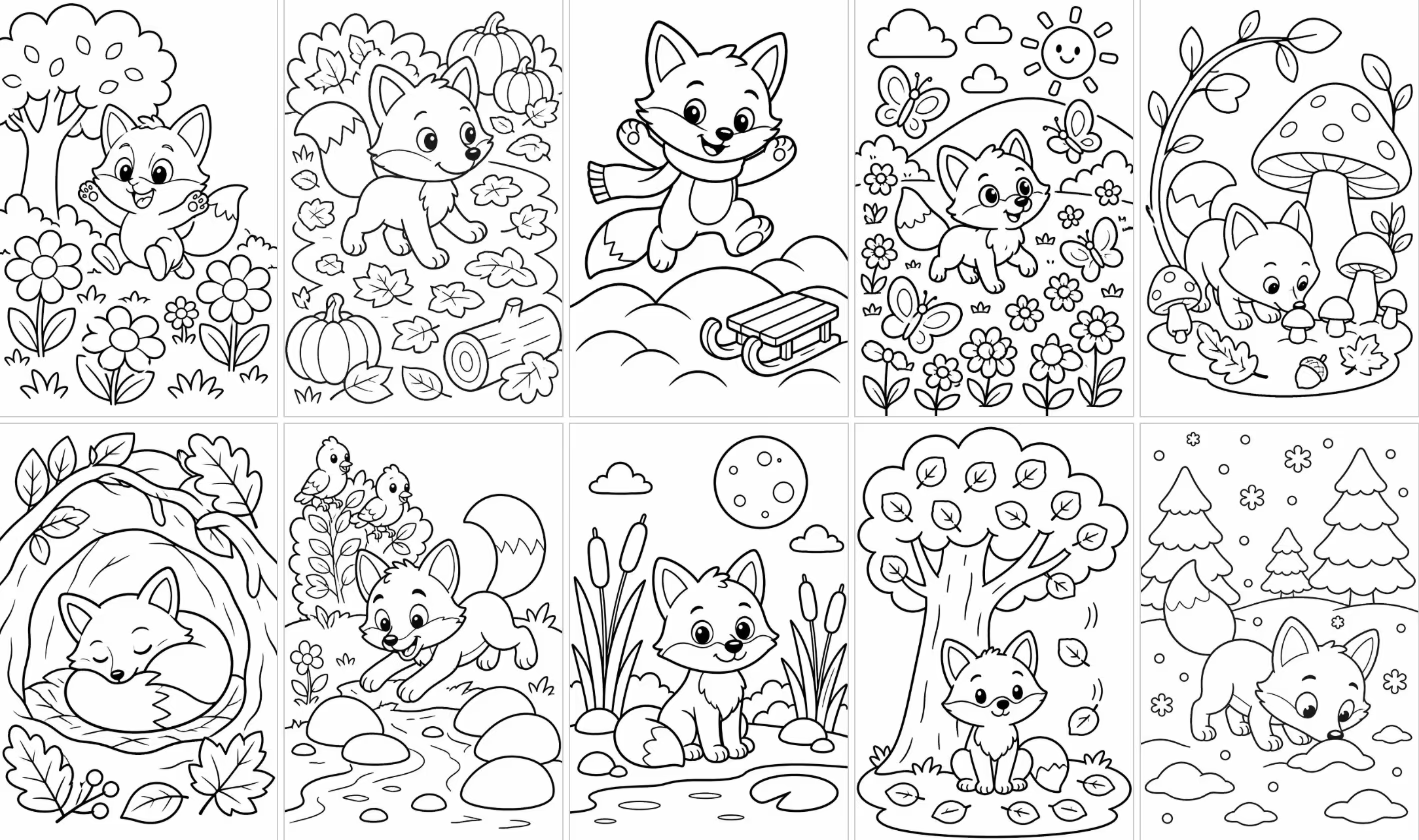
We asked every tool for the same book. It was The Little Fox’s Year, 10 pages for children ages 6 to 8, with the same fox on every page and simple thick lines. Where a tool asked for a description of each page, it got the 10 page descriptions listed in the method.
| Tool | What happened | Pages you get | Download without a plan | To get the whole book, per its site |
|---|---|---|---|---|
| Colorin AI Our product | It started with the 42 credits left after the photo and prompt tests, wrote 10 page ideas from one description of the book and made the book in 62 seconds, for 30 credits. Without a plan, a book can have up to 15 pages | 10 of 10, without a cover | Offers the book as a PDF, without asking you to pay | No plan needed |
| mycoloring.ai | It started with 8 credits. Making a character sheet of the fox cost 2, and the account gets one free sample of a book. The book kept its default of 20 pages instead of our 10 | A color cover and page 1 | The sample, as a PNG | A plan, from Starter, or a one-time credit pack |
| iColoring AI | Tested without an account, with the 6 credits it gives a visitor. It made one image with the 10 scenes in small panels | 1 sheet | That sheet, as a PNG or a PDF | Its site doesn’t say how many pages the book tool makes |
| ColoringBook.ai | It started with 4 credits. The account could pick only a 5-page book, at 2 credits a page. Its site offers new users a trial book, and none appeared on our account, which was opened in April 2026 | 0 | The book didn’t start | A plan, from Starter, for books of up to 10 pages |
| Colorify AI | It started with 3 credits. Its smallest book has 5 pages and costs 5 credits | 0 | The book didn’t start | More credits, which its site sells in plans and credit packs |
| ColorBliss | It started with 12 credits, on an account that wasn’t new (it had pages from 2025). Bulk Generation, which makes many pages at once, is available on the Artist, Business and Ultra plans | 0 | Not available without a plan | The Artist plan or higher |
- The 42 credits of Colorin AI are what was left after the coloring page from the photo and the one from the prompt, out of the 48 a new account comes with.
- We stopped at each download button and didn’t download the files in this round, so the download column says what each screen offered.
- The last column is what each tool’s site said on November 9, 2026.
- iColoring AI was tested without an account, because signing up didn’t work for us.
A Coloring Page from a Photo and from a Prompt
Every tool got the same dog photo, and each tool with credits left got the same written prompt. All of them used their default settings, and we timed each coloring page from the click on generate until the page showed on screen.
The prompt: “A friendly fox reading a book under a big oak tree, black and white line art coloring page, no shading, no gray, no text”

| Tool | From the photo | From the prompt | Watermark on screen |
|---|---|---|---|
| Colorin AI Our product | 14 seconds, 3 credits | 14 seconds, 3 credits | None |
| ColorBliss | 32 seconds, 3 credits, on an account that wasn’t new | 18 seconds, 0 credits | None |
| mycoloring.ai | Up to 50 seconds, 4 credits | Didn’t finish (the page froze, possibly on our side) | None on the photo page |
| Colorify AI | Up to 25 seconds, 1 credit | 24 seconds, 1 credit | Yes, at the bottom |
| ColoringBook.ai | 62 seconds, 2 credits, on an account that wasn’t new | Up to 49 seconds, 1 credit | Yes, at the bottom |
| iColoring AI | Up to 132 seconds, 3 credits, without an account | Out of credits | Yes, at the bottom |
- Where a time says “up to”, the coloring page was ready when we checked, without an exact stopwatch time.
- A credit is each tool’s own unit, so the credits don’t compare from one tool to another.
- For a page from a prompt, the default option of mycoloring.ai costs 4 credits, and the account had 2 left. With the 2-credit option, the page froze all three times we tried. That may have been on our side, so we don’t count it against the tool.
- We also measured every image, and none had areas of solid gray.
Which Coloring Pages Are Easiest to Color
Two AI models made by Anthropic, Claude Opus and Claude Sonnet, graded every coloring page without the tool names. Each image got a random letter and the same crop on every edge, so no watermark showed. Each point scores 0 to 2, and the tables show the average of the two graders.
- Closed lines. Every shape is closed, so the color stays inside.
- No gray. Black lines on white, with no shading to color over. Fine lines packed so close that they look like shading also lose points.
- Anatomy. The dog or the fox looks right, with nothing extra or missing.
- Likeness. The coloring page shows the dog in the photo. Photo test only.
- Space to color. Areas big enough for a child of 6 to 8 with crayons.
- Same fox. The fox looks like the same fox from page to page. Book test only.
From the Photo, Out of 10
| Tool | Closed lines | No gray | Anatomy | Likeness | Space to color | Total |
|---|---|---|---|---|---|---|
| Colorin AI Our product | 2 | 2 | 2 | 1 | 2 | 9 |
| mycoloring.ai | 1.5 | 1.5 | 2 | 2 | 1 | 8 |
| ColoringBook.ai | 2 | 2 | 1 | 1 | 2 | 8 |
| Colorify AI | 1 | 1 | 1.5 | 2 | 0.5 | 6 |
| iColoring AI | 1 | 1.5 | 1 | 1 | 1.5 | 6 |
| ColorBliss | 0.5 | 1 | 2 | 2 | 0 | 5.5 |
From the Prompt, Out of 8
| Tool | Closed lines | No gray | Anatomy | Space to color | Total |
|---|---|---|---|---|---|
| Colorin AI Our product | 2 | 2 | 2 | 2 | 8 |
| ColoringBook.ai | 2 | 2 | 1.5 | 1.5 | 7 |
| Colorify AI | 1.5 | 1.5 | 2 | 1.5 | 6.5 |
| ColorBliss | 1 | 0.5 | 1 | 0.5 | 3 |
The 10-Page Book, Out of 10
| Tool | Closed lines | No gray | Anatomy | Space to color | Same fox | Total |
|---|---|---|---|---|---|---|
| Colorin AI 10 pages Our product | 2 | 2 | 1.5 | 2 | 1 | 8.5 |
| iColoring AI 1 sheet with 10 panels | 1.5 | 1.5 | 2 | 1 | 2 | 8 |
- The two graders didn’t agree on the book. One put iColoring AI first, and the other put Colorin AI first. With one result per test, the book has no clear winner on quality.
- The fox in the Colorin AI book changes its proportions and its face from page to page, and the book lost points for that. Keeping the same character is part of the paid plans, and we didn’t test it here.
- The free sample from mycoloring.ai had one page, and it scored 8 of 8 on the four points that apply to one page.
- On the photo, one grader tied Colorin AI and mycoloring.ai at 9 of 10.
- With one image per test, half a point doesn’t separate two tools.
- We graded for a child, because the test book is for ages 6 to 8. Tools with fine, detailed lines score lower on this scale and would likely score higher on one made for adult coloring books.
- The graders are two AI models from the same family, so they count for less than two independent people.
The Best AI Coloring Book Generator for Each Job
There is no overall winner in this test, so the tool that came out ahead before paying is named for each job below.
A Whole Coloring Book Offered as a PDF Before You Pay
Colorin AI (our product). Colorin AI was the only tool in our test where an account without a plan finished all 10 pages and offered the book as a PDF.
A Coloring Page That Looks Like the Photo
mycoloring.ai, ColorBliss, Colorify AI. They scored full marks for likeness to the dog in the photo. Colorin AI scored 1 of 2 with Kawaii, the style its photo tool starts with. We didn’t test its other styles.
The Same Character on Every Page
iColoring AI, mycoloring.ai. In our test, iColoring AI kept the fox the same in the small panels of its one sheet. Without a plan, mycoloring.ai makes a character sheet in three angles for 2 credits. In Colorin AI, keeping the same character on every page is part of the paid plans, and we didn’t test it here.
A Color Cover Made by AI Before You Pay
mycoloring.ai. The free sample from mycoloring.ai came with a color cover that has the book’s title on it. Without a plan, Colorin AI opens the cover editor with its templates, and we didn’t make a cover in this test.
A Coloring Page from a Prompt That Uses No Credits
ColorBliss. ColorBliss made the coloring page from the prompt for 0 credits, with its button marked free. That page got the lowest score in our grading.
Coloring Pages That Are Easy for a Child to Color
Colorin AI (our product). Colorin AI got full marks for closed lines, no gray and space to color with the photo, the prompt and the book.
What a New Colorin AI Account Can Do
- A new account comes with 48 credits for trial pages, which is 16 coloring pages in Standard, the quality the app uses by default.
- The 10-page book used 30 of those credits, and one coloring page uses 3.
- The book is offered as one PDF, and nothing we made showed a watermark on screen.
- Without a plan, a book downloads in one Amazon KDP size, the square 8.5 by 8.5 inches. The other KDP sizes and the same character on every page come with the paid plans.
- On the paid plans, a book can have from 25 to 150 pages, depending on the plan.
- Every plan includes a commercial license, the free account too, so you can sell what you make on Amazon KDP or Etsy.
How We Tested
Anyone can repeat this test with the same photo, prompt and book.
- When. On November 9, 2026, within two hours, on one computer and one browser.
- Accounts. Each tool’s account without a paid plan, and no card. iColoring AI was tested without an account, and the Colorin AI account was new.
- The photo. A dog photo made with AI, so it shows no real person or pet.
- Settings. Each tool’s defaults. When a tool asked us to choose, we picked a portrait page, the simplest or cartoon style and standard quality.
- Results. The first result counts, with one pass per test.
- Timing. From the click on generate until the coloring page showed on screen. In seven tests we timed the page with a stopwatch. In the others, the time is when we checked and saw the page ready.
- Grading. Blind, by two AI models, with the average of the two on this page.
The 10 Page Descriptions of the Book
- A small fox waking up in its burrow in early spring
- The fox smelling tulips in a meadow
- The fox splashing in a stream on a rainy day
- The fox chasing butterflies in tall summer grass
- The fox picking berries beside a bush
- The fox watching fireflies at night
- The fox jumping in a pile of autumn leaves
- The fox gathering acorns with a squirrel
- The fox making paw prints in fresh snow
- The fox sleeping in its burrow in winter
What This Test Doesn’t Tell You
- How each tool does on a paid plan, because we tested accounts without a plan only.
- What the downloaded files look like, in size, margins and watermark, because we didn’t download them in this round.
- Whether Amazon KDP accepts a book made with these tools, because we didn’t upload one.
- How a tool does on average, because each test is one result and the same prompt gives a different page each time.
- How the ColorBliss and ColoringBook.ai accounts compare with new ones, because those accounts already had pages from before.
Questions About AI Coloring Book Generators
Which AI coloring book generator lets you finish a book before you pay?
We tested six tools on November 9, 2026. Colorin AI was the only one that finished all 10 pages without a plan and offered the PDF. mycoloring.ai gives a free sample with the cover and the first page.
Which AI tool turns a photo into the most accurate coloring page?
In our blind grading of one dog photo, mycoloring.ai, ColorBliss and Colorify AI scored full marks for likeness. Colorin AI scored lower for likeness and higher for how easy the page is to color.
Do AI coloring page generators add a watermark?
On screen, ColoringBook.ai and Colorify AI showed a watermark at the bottom of their coloring pages from the photo and the prompt. So did iColoring AI, on its coloring page from the photo. Colorin AI, ColorBliss and mycoloring.ai showed none, and neither did the iColoring AI book sheet. We didn’t download the files in this test.
Can an AI coloring book generator keep the same character on every page?
In our test, iColoring AI kept the fox the same in the small panels of its one sheet. mycoloring.ai makes a character sheet for 2 credits. In Colorin AI, keeping the same character on every page is part of the paid plans, and we didn’t test it here.
Is this comparison independent?
No. Colorin AI is our product. To keep the test fair, we ran every tool on the same day with the same photo and book. Each tool with credits left also got the same prompt. We wrote the method on this page and graded the pages without the tool names.
Make Your Own Coloring Book
Write one idea for the book, and every page comes out in the same style. Create your coloring book.
We ran this test with three Colorin AI tools.
- The AI coloring book generator makes a whole coloring book from one idea, with every page in one style.
- The AI coloring page generator makes one coloring page from a few words.
- Photo to coloring page makes a coloring page from your photo, in black lines to color.